
Business FAQ
We're here to help.
Account Information FAQs
-
What is my routing number?
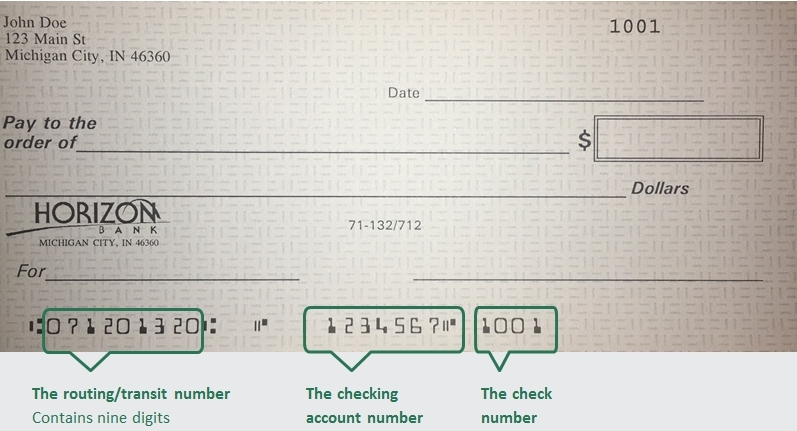
The Amercian Bank Association (ABA) routing/transit number and your Horizon Bank account number are located on the lower left-hand corner of your check as shown below. Horizon Bank's routing number is 071201320.
-
How do I report a lost debit card?
Report your lost or stolen debit card by calling 888-873-2640.
-
How do I order checks?
Personal Checks
To order checks click here. or you can contact your local branch. To find your local branch you can click here.
Business Checks
Order business checks here.
-
How do I find my account number?
Contact call customer service at 888-873-2640 or visit your local branch for help with your account number
-
How do I enroll in online banking?
Personal accounts
Business accounts
A business customer can enroll in online banking by contacting their Business Banker who will verify pertinent information and submit enrollment electronically. The customer will choose a login ID and temporary password during the enrollment process. -
What information do I need to open an account online?
To open an account, we will need a valid US State or Federal issued ID, Social Security Number, and an opening deposit.
-
What if I don’t remember my Online ID or password?
To reset your password for Online Banking Click here. You will be prompted to enter your login name and then can select how to receive a Secure Access Code. After successfully entering that code you will be able to set a new password.
If you forgot your User ID, recover your User ID here.
-
Is online banking safe?
Click here to learn more about online banking security at Horizon Bank.
-
How do I report fraud on my account?
Contact your local branch to begin the dispute investigation for this transaction. If after hours, call 888-873-2640 to report the transaction to the 24-hour fraud investigation team.
-
What is the bank's mailing address?
Please mail all general correspondence to our corporate office.
Horizon Bank
PO Box 800
Michigan City, IN 46361 -
Where do I submit a complaint?
Horizon Bank wants to ensure we do all we can to correct any issues you may have. You may submit your concern in any of the following ways:
- You can submit a complaint in online banking using the secure message function, located in Services & Settings
- By phone or in person at your local branch
- Contacting our Communications Center at 888-873-2640
- In writing by sending your letter to Horizon Bank PO Box 800 Michigan City, IN 46361
-
How do I serve Legal Documents?
Horizon Bank provides guidelines for processing subpoenas and other legal documents, including summons, garnishments, and governmental inquiries. Subpoenas, and legal documents must be served on the registered/resident agent in the appropriate state. Horizon Bank also charges applicable fees for document requests, research, and delivery services. For more details on submission requirements and associated costs, refer to the full document linked below.
Bill Pay
-
How do I set up/enroll in Bill Pay?
To enroll in bill pay in Online Banking select Menu, Move Money, then select Pay Bills. Then select the account that you want to set up as the funding account.
-
How do I turn off autopay?
Once you have accessed the Bill Payment Center in Online Banking, select Autopay (located next to the payee you wish to cancel). From this window you can turn off the autopay option.
-
How do I add another funding account to Bill Pay?
To add an account, you can contact the Communications Center at 1-888-873-2640 and we can add another one of your Horizon Bank accounts to choose from for making payments in Bill pay.
-
How do I see more details for Bill Pay on a Mobile Device?
Select "Bill Pay." From this screen select “Options”. This will open a small window where you select "Visit Bill Pay Site". You will see the same version used when logging into our full site with full functionality including scheduling payments and obtaining confirmation numbers.
-
How do I delete a Payee?
To delete a payee in Bill Pay, login to your bill payment center. Select the drop down option located next to the payee you wish to delete. This should open a small window where you will select “Delete.”
Certification of Beneficial Owners Form
Commercial Lending Financial Statement Collection
-
How to Complete and Submit Financial Statement Collection
Follow the steps below to complete your financial statement and securely provide it to our team. Review the FAQs for guidance and select the appropriate form to get started.
Health Savings Account (HSA) FAQs
-
What expenses are qualified to be paid with a Health Savings Account (HSA)?
- Actual medical expenses such as prescriptions, doctor visits, dental care, medical care transportation, etc.
- Long-term care health insurance
- Healthcare coverage
- Unemployed or Benefit Continuation
- Some health insurance after the age of 65
Note: Uses of HSA assets that are not qualified will be subject to taxation, and a 20% penalty unless the HSA account beneficiary is age 65 years or older is disabled or dies.
-
Am I Eligible for an HSA account?
You are eligible if you have a high-deductible health plan (HDHP) and you are not covered by any other health plan that is not an HDHP (with limited exceptions). You are not entitled to benefits under Medicare (generally not yet age 65). If someone else cannot claim you as a dependent on their tax return.
-
What Are the HSA Contribution Limits?
The total amount you or your employer may contribute to an HSA for any taxable year depends on whether you have individual or family coverage under a high-deductible health plan.
2026 HSA Contribution Limits: Self Only: $4,400; Family: $8,750. If you are 55 or older, add the catch-up contribution — standard annual limit plus $1,000.
As always, employer contributions count toward this total annual limit, and you must be enrolled in an HSA-eligible high-deductible health plan (HDHP) for the coverage type (self-only or family) you use.
-
How Do I Report Contributions to My HSA?
Horizon Bank will provide all necessary tax documents for your filing purposes.
-
I'm Self-Employed. Am I Still Eligible for an HSA?
Self-employed people may have an HSA. Self-employed individuals are often perfect candidates for an HSA. HSAs are ideal for the self-employed for the following reasons: high-deductible insurance plans often contain significant premium costs, and HSAs can be a useful cost management resource for the employer. The employer is protected from substantial healthcare expenses. The HSA may provide for both retirement and medical expenses.
-
What are the benefits for your employees?
Control - Your employees have control of their money. They decide whether to save it or use it for medical expenses. They can also choose which expenses to pay from the account.
Flexibility - HSA funds can be used for a wide range of healthcare-related expenses not typically covered by other healthcare accounts, such as purchasing long-term care insurance.
Easy payment tracking - A Mastercard® HSA debit card makes payment easy, and spending can be tracked via secure online banking or mobile app.
Ownership - The money your employees save will remain with them regardless of employment status. An HSA is a lifetime account that is not tied to any one health plan or employer.
Mastercard is a registered trademark, and the circles design is a trademark of Mastercard International Incorporated.