
Personal FAQ
We're here to help.
Account Information
-
What is my routing number?
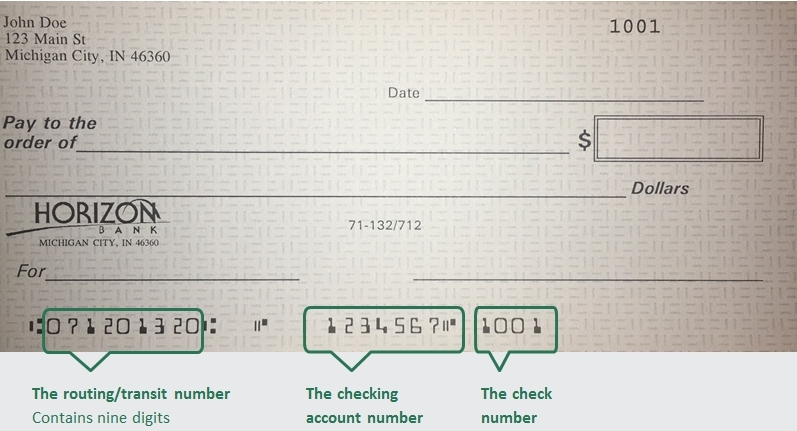
The Amercian Bank Association (ABA) routing/transit number and your Horizon Bank account number are located on the lower left-hand corner of your check as shown below. Horizon Bank's routing number is 071201320.
-
How do I report a lost debit card?
Report your lost or stolen debit card by calling 888-873-2640.
-
How do I order checks?
Personal Checks
To order checks click here. or you can contact your local branch. To find your local branch you can click here.
Business Checks
Order business checks here.
-
How do I find my account number?
-
How do I enroll in online banking?
Personal accounts
Business accounts
A business customer can enroll in online banking by contacting their Business Banker who will verify pertinent information and submit enrollment electronically. The customer will choose a login ID and temporary password during the enrollment process. -
What information do I need to open an account online?
To open an account, we will need a valid US State or Federal issued ID, Social Security Number, and an opening deposit.
-
What if I don’t remember my Online ID or password?
To reset your password for Online Banking Click here. You will be prompted to enter your login name and then can select how to receive a Secure Access Code. After successfully entering that code you will be able to set a new password.
If you forgot your User ID, recover your User ID here.
-
Is online banking safe?
Click here to learn more about online banking security at Horizon Bank.
-
How do I report fraud on my account?
Contact your local branch to begin the dispute investigation for this transaction. If after hours, call 888-873-2640 to report the transaction to the 24-hour fraud investigation team.
-
What is the bank's mailing address?
Please mail all general correspondence to our corporate office.
Horizon Bank
PO Box 800
Michigan City, IN 46361 -
Where do I submit a complaint?
Horizon Bank wants to ensure we do all we can to correct any issues you may have. You may submit your concern in any of the following ways:
- You can submit a complaint in online banking using the secure message function, located in Services & Settings
- By phone or in person at your local branch
- Contacting our Communications Center at 888-873-2640
- In writing by sending your letter to Horizon Bank PO Box 800 Michigan City, IN 46361
-
How do I serve Legal Documents?
Horizon Bank provides guidelines for processing subpoenas and other legal documents, including summons, garnishments, and governmental inquiries. Subpoenas and legal documents must be served on the registered/resident agent in the appropriate state. Horizon Bank also charges applicable fees for document requests, research, and delivery services. For more details on submission requirements and associated costs, refer to the full document linked below.
Bill Pay
-
How do I set up/enroll in Bill Pay?
To enroll in bill pay in Online Banking select Menu, Move Money, then select Pay Bills. Then select the account that you want to set up as the funding account.
-
How do I turn off autopay?
Once you have accessed the Bill Payment Center in Online Banking, select Autopay (located next to the payee you wish to cancel). From this window you can turn off the autopay option.
-
How do I add another funding account to Bill Pay?
To add an account, you can contact the Communications Center at 1-888-873-2640 and we can add another one of your Horizon Bank accounts to choose from for making payments in Bill pay.
-
How do I see more details for Bill Pay on a Mobile Device?
Select "Bill Pay". From this screen select “Options.” This will open a small window where you select "Visit Bill Pay Site." You will see the same version used when logging into our full site with full functionality including scheduling payments and obtaining confirmation numbers.
-
How do I delete a Payee?
To delete a payee in Bill Pay, login to your bill payment center. Select the drop down option located next to the payee you wish to delete. This should open a small window where you will select “Delete”.
CardValet Quick Reference Guide
Checking
-
How do I make a deposit?
There are several ways you can make a deposit into your Horizon Bank Checking or Savings account.
External Account. Link your account to an account you have at another bank. By doing this you can easily transfer funds
between your accounts.
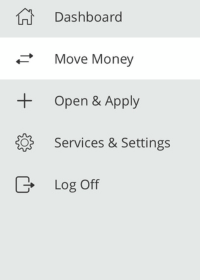
- Log in to Online Banking and click Move Money > Add External Account from the menu.
- Follow the instructions to connect your account.
We make two small deposits of random amounts into your account at the other institution. When the deposits are complete, you enter and verify the amounts in either online banking or mobile banking. The deposits verify your ownership of the account and that any future transfers to or from that account will process correctly. The deposits should take fewer than five business days to process.
Note: You can only request external transfer accounts held at domestic (the United States and US territories) FIs that use American Bankers Association (ABA) routing numbers.
Mobile Deposit. Deposit a check from anywhere, anytime with Mobile Deposit. Follow these steps on our mobile app to snap a picture of your check:
The first step is to enroll in Mobile Deposit.
- Log in to Online Banking and click Services & Settings > Mobile Deposit Enrollment.
- Download the Horizon Bank Mobile App, if you haven’t already.
- Click Deposit Check icon at the bottom of the screen and select your account and deposit amount
- Take photos of the front and back of your check (please write “for Horizon Bank mobile deposit” and sign your name on the back of the check prior to taking the picture.)
- Click Submit Deposit
ATM Deposit. If you live near a Horizon Bank branch or ATM location, you can make a check deposit at one of these ATM locations. List of ATMs that accept deposits.
Direct Deposit. Set up direct deposit in minutes.
Make a transfer
To make a transfer between your Horizon Bank accounts, log in to Online Banking from the mobile app or your computer.
From our mobile app.
- Click the Transfer icon at the bottom of your screen
- Select the account you want to transfer from
- Select which account to transfer to
- Enter the amount of the transfer
- Is this one transfer or set setup the frequency you would like to make this transfer automatically
- Select the date to make the transfer
- Add a memo, if applicable
- Click Transfer Funds
From the computer
- Log in to Online Banking
- Select Funds Transfer from the Move Money Tile
- Follow all remaining steps as shown above
Transfers between Horizon accounts made after 9 pm CST on a business day will post on the following business day. Transfers made on a weekend or holiday will post on the following business day. External loan payments and external transfers submitted before 3 pm on a business day, will post on the following business day. Principal only payments can't be paid from an external account.
-
How do I close an account?
To close an account you may either visit your local branch or send a signed letter, requesting that your account be closed and mail it to:
Horizon Bank
PO Box 800
Michigan City IN 46361If you're requesting that the remaining proceeds be mailed anywhere other than the address on file, you will need to sign the letter and include a copy of your state-issued identification or have it notarized.
-
How can I avoid ATM fees?
When conducting an ATM transaction you may receive a service fee through Horizon Bank and one from the ATM machine.
To prevent service fees on our end, visit www.moneypass.com to find a surcharge-free ATM near you. You will still be charged a service fee from that machine, but not by Horizon Bank.
You can avoid fees altogether by using an ATM at a Horizon branch. Click here to find branches that have ATMs.
Certificate of Deposit (CDs)
-
What is a Certificate of Deposit?
A Certificate of Deposit (CD) is a savings certificate that entitles you to receive interest, restricting you from withdrawing on demand without incurring a penalty.
By opening the CD, you agree to leave your one-time deposit in the account for a fixed amount of time. In exchange for agreeing to a set term length, you get a fixed interest rate, typically one that is higher than a traditional savings account. Generally, the longer the term length, the higher the interest rate. Keep in mind, you often cannot access your money until your CD term ends without incurring a penalty. CDs are a great way to reach your savings goals faster-using money that you don't need immediately.
-
Are CDs safe?
Horizon Bank’s CD accounts are insured by the Federal Deposit Insurance Corporation (FDIC) up to allowable limits.
-
Why would I want a CD over a less restrictive saving option?
CDs are a great way to make your wealth grow, so long as you have clear financial long or short-term goals in mind for your money. With competitive rates of interest, you may get the most return on your money with this type of savings.
-
How much interest will I earn on a CD?
How much interest you earn on your CD will depend on how much you deposit, your specific term, and your interest rate. Contact a Horizon Bank advisor to review your rate and term options to see how much you can earn. You can also use a CD calculator to get an estimated return.
-
How much money do you need to open a CD?
Most Horizon Bank CDs require a minimum deposit of $500 to open an account.
-
Can I add money to my existing CD?
Often you cannot add money to an existing CD, yet you can open additional CDs for a shorter or longer term.
-
Can I withdraw my money before the CD term is over?
If you choose to withdraw money from your CD before it matures, you will likely have to pay a fee called an early withdrawal penalty.
Debit Card
-
What is a Debit Card?
The Horizon debit card looks like a Mastercard credit card but operates like cash or a personal check. While a credit card is a "way to pay later" a debit card is a "way to pay now". When you use a debit card, your money is quickly deducted from your checking account.
-
How do I get a Debit Card?
Visit your local branch to receive an instant issue debit card or call 1-888-873-2640 to receive a debit card by mail in 7-10 business days.
-
What is my debit card daily spending limit?
For most accounts, the ATM daily limit is $700 and the daily Point of Sale (POS) limit is $5,000. Limits may vary based on your account type.
-
How do I activate my debit card?
To activate your debit card, please contact our card activation line at 1-800-992-3808.
-
What are the benefits of a debit card?
Using a debit card instead of writing checks saves you from showing identification or giving out personal information at the time of the transaction.
Using the debit card frees you from carrying cash or a checkbook.
Your debit card transactions will be shown in detail on your monthly checking account statement.
Using a debit card means you no longer have to carry cash or overspend on credit cards when you travel.
Debit cards may be more readily accepted than checks, especially in other states or countries wherever MasterCard is accepted.
Obtaining a debit card is often easier than obtaining a credit card. -
What is Enfact Debit Card Protection?
Enfact is a Debit Card fraud service that detects suspicious activity on your Horizon Bank debit card. Trained analysts watch for suspicious transaction activity on your behalf, 24/7, 365 days a year. Click here to learn more about this free service.
-
What if my card is lost or stolen?
Please call 888-873-2640 to report your lost or stolen card immediately.
-
Why should I notify Horizon Bank when I travel?
Always let Horizon Bank know when you plan to travel. This helps to avoid potential blocks on your debit card. We recommend always carrying multiple forms of payment with you just in case.
-
How do I unlock my debit card from too many wrong pin attempts?
After three invalid PIN attempts, your card is locked for an hour and is unable to be used. Once this timeframe is met, the card is able to be used once again. If you had forgotten your PIN, please contact our card activation line at 800-992-3808.
-
Where can I use my debit card?
Horizon's Mastercard® debit card is accepted anywhere you see the Mastercard logo including grocery stores, retail stores, gasoline stations, and restaurants worldwide.
-
My Debit Card does not work. Help?
Did you receive a call, text, or email from Horizon Bank's fraud detection group? If so, respond to the email or text message. If you received a call, please dial 833-735-1891 and provide the case number you were given in the message.
-
What is the difference between credit cards and debit cards?
Debit cards allow you to spend only what is in your bank account. It is a quick transaction between the merchant and your personal bank account. Credit cards are revolving lines of credit made available to you just like a loan. The amount the credit card issuer allows you to use is determined by your credit history, income, debts, and ability to pay. You may use the line available on the credit card with the understanding that you will repay the amount, plus interest if you do not pay in full each month.
-
What is partial approval for debit cards?
If you do not have enough money available in your checking account to complete the charge with your debit card, you can receive partial approval for your transaction instead of being declined. The remainder must be paid with another form of payment such as another credit card or cash.
-
Can I turn my card on or off?
Our CardValet® app gives you the ability to turn your card on or off, in an instant for any reason. Learn more about CardValet.
Digital Wallet
-
Is it free to use a digital wallet?
Yes. Be aware that message and data rates may apply, depending on your device's data plan.
-
How secure is it to use?
The safety and security of your account is a top priority. When you pay with a digital wallet and your Horizon Bank debit or credit card, your actual card number is replaced with a unique digital card number, which means businesses do not see or store your full card number. Plus, every transaction makes you verify your identity through your device, either by passcode, fingerprint, or face/retinal scan.
-
I have a question that is not listed here. Who should I contact?
You may call Customer Service at 888-873-2640. For more detailed technical information, visit the website for your particular device.
-
How do I use Apple Pay?
From your smart phone, go to your wallet and follow the instructions given on your phone's screen.
-
How do I setup Samsung Pay?
- To setup Samsung Pay follow these instructions:
Choose the Samsung Pay icon - Log in using your Samsung account information. If you do not already have a Samsung account, you can create one.
- Once logged in click ADD CARD in Samsung Pay app.
- Center the card in the on-screen window and Samsung Pay will read the card number. Or you can enter the card number manually.
- Verify or enter the additional information such as Cardholder Name, Expiration Date and Security Code (CVV).
- Accept the Terms and Conditions by clicking AGREE TO ALL.
- You may be prompted to select a delivery method for receiving a One Time Passcode, such as SMS, EMAIL or CALL IN. The One Time Passcode will be delivered to the destination selected.
- Enter the code received and touch SUBMIT.
- Once complete, your card is ready for use in Samsung Pay.
- To setup Samsung Pay follow these instructions:
-
How do I setup Google Wallet?
To set up Google Wallet you can use the following instructions
Download and install the Google Wallet app from the Google Play Store.Open the Google Wallet app, and Sign In (if prompted).
Tap the View Wallet button.
Next, tap on the Add to Wallet button.
Tap Payment Card, and then New credit or debit card.Next you will need to hold your card in the camera window that pops up. After the camera captures your card's information, verify your card's expiration date and CVC number.
Verify your billing address.
Tap the Save and continue button at the bottom of the screen.
Read the Terms of Service, and tap the Accept button at the bottom of the screen.
Choose to verify your card information with your bank via text or email, and hit continue.Next, you'll find yourself on the Verify Your Card screen. Choose where you want to receive the verification number.
Tap the Continue button.When you receive the number, type it into the field on the Verification Number screen and tap the Submit button.
Enfact
-
How do text alerts work?
Once enrolled, you may receive a text if unusual activity is detected on your account. The text alert will come from 69293. Simply follow the text message prompts and respond.
If you recognize the transaction, you should reply “YES” and your card would continue operating as normal.
If you do not recognize the transaction, you should reply “NO” and your card would have a temporary hold placed. You may be instructed to call us to further review any additional activity.
-
What questions will you be asked?
To identify yourself, you will be asked for some basic information.
You may be asked things like:
1. Your Name
2. The last 4 Digits of your Social Security Number (but never your full SSN)
3. A case number
Here are items you would NEVER be asked to provide and would be a sign of a fraudulent caller.
1. Your full card number information, including the 3-digit code from the back of the card
2. Your Personal Identification Number (PIN) information
3. Your full Social Security Number
4. Any secret password information -
What numbers will EnFact call or text me from?
Text message alerts: If our system detects unusual activity on your card, you will receive a text message with details about the suspected transaction. Legitimate EnFact text alerts will never include a link.
Do not click on any link in a text message claiming to be from EnFact. Authentic alerts will describe the suspicious transaction and ask you to reply directly with options such as “yes,” “no,” “help,” or “stop.”
EnFact alerts will always come from a 5-digit short code, not from a standard 10-digit phone number.
You will also receive a phone call, which is generated from random numbers. Make sure Horizon Bank has your current contact information so you can be reached if fraudulent activity is suspected.
Always let Horizon Bank know when you plan to travel. This helps to avoid potential blocks on your debit card. We recommend always carrying multiple forms of payment with you, just in case.
We may call you:
If we suspect fraudulent activity on your debit card and cannot reach you by text, a Horizon Bank Fraud Detection advisor may call to verify your recent transactions. Your prompt response is important to help prevent potential fraud and avoid any restrictions on your card.
Our automated call system may ask you to confirm your identity and enter your 5-digit ZIP code using your phone keypad. You will not be asked to provide sensitive personal information.
If you indicate that a transaction is fraudulent, your call may be transferred to a representative who will ask additional questions to verify your identity before reviewing your transactions. You will also be given a toll-free number if you need further assistance.
To ensure we can contact you quickly if suspicious activity occurs, please keep your phone numbers (mobile, home, and work) and mailing address up to date.
-
What should you do if contacted?
- Confirm or deny transactions.
- If transactions are legitimate your card will be cleared, and the transaction will be processed.
- If transactions are fraud, you will be asked to contact your local branch or the Communications Center to start the debit card dispute process.
-
What should you NOT do if contacted?
- Do not click any links
- Never give out your pin or any codes that are sent to you (even if the person calling claims to be Horizon Bank.
- If someone is urging you to confirm a "not fraud" action for a purchase you did not make, it is likely a phishing scam.
-
What kind of activity might be considered suspicious?
- Your card was used to make a purchase out-of-state (be sure to tell us if you're traveling, so we can flag your card).
- Your card was used to make a transaction with a larger dollar amount, or a series of larger dollar amounts than you typically spend.
- Your card was used to make a purchase at a store you haven't frequented or visited in the past.
- Your card was used out-of-state or at a retailer, you don't frequent and your PIN number was entered wrong.
- Keep in mind that you may not receive a call each time you find yourself in one of these situations. EnFact predicts the probability of fraud by comparing current transactions to current fraud trends and reaches out when something seems suspicious.
-
How will EnFact contact me about potential fraud?
If EnFact detects suspicious activity on your debit card, you may be contacted through one or more of the following methods:
Phone call
Text message
Email
For your security, the phone number used for calls may vary and may not always be the same. If you receive a text message or email alert, it will include a contact phone number along with additional instructions.
Please note that the caller ID information may also be referenced within the message so you can verify the communication.
Health Savings Account
-
What expenses are qualified to be paid with a Health Savings Account (HSA)?
- Actual medical expenses such as prescriptions, doctor visits, dental care, medical care transportation, etc.
- Long-term care health insurance
- Healthcare coverage
- Unemployed or Benefit Continuation
- Some health insurance after the age of 65
Note: Uses of HSA assets that are not qualified will be subject to taxation, and a 20% penalty unless the HSA account beneficiary is age 65 years or older is disabled or dies.
-
Am I Eligible for an HSA account?
You are eligible if you have a high-deductible health plan (HDHP) and you are not covered by any other health plan that is not an HDHP (with limited exceptions). You are not entitled to benefits under Medicare (generally not yet age 65). If someone else cannot claim you as a dependent on their tax return.
-
What Are the HSA Contribution Limits?
The total amount you or your employer may contribute to an HSA for any taxable year depends on whether you have individual or family coverage under a high-deductible health plan.
2026 HSA Contribution Limits: Self Only: $4,400; Family: $8,750. If you are 55 or older, add the catch-up contribution — standard annual limit plus $1,000.
As always, employer contributions count toward this total annual limit, and you must be enrolled in an HSA-eligible high-deductible health plan (HDHP) for the coverage type (self-only or family) you use.
-
How Do I Report Contributions to My HSA?
Horizon Bank will provide all necessary tax documents for your filing purposes.
-
I'm Self-Employed. Am I Still Eligible for an HSA?
Self-employed people may have an HSA. Self-employed individuals are often perfect candidates for an HSA. HSAs are ideal for the self-employed for the following reasons: Often, High-deductible insurance plans contain significant premium costs, and HSAs can be a useful cost management resource for the employer. The employer is protected from substantial healthcare expenses. The HSA may provide for both retirement and medical expenses.
-
What are the advantages for your business?
Health Savings Accounts (HSA) are compatible with any qualified high-deductible health plan, so you don't have to change your HSA provider if you change your insurance provider.
-
What are the benefits for your employees?
Control - Your employees have control of their money. They decide whether to save it or use it for medical expenses. They can also choose which expenses to pay from the account.
Flexibility - HSA funds can be used for a wide range of healthcare-related expenses not typically covered by other health care accounts, such as purchasing long-term care insurance.
Easy payment tracking - A Mastercard HSA debit card makes payment easy, and spending can be tracked via secure online banking or mobile app.
Ownership - The money your employees save will remain with them regardless of employment status. An HSA is a lifetime account that is not tied to any one health plan or employer.
Individual Retirement Account
-
What are individual retirement accounts?
Individual Retirement Accounts (IRAs) are designed to help you plan for your retirement. They are technically a type of savings plan, but designed to offer significant tax benefits that save you the most money for when you're ready to retire.
-
When can withdrawals be made?
Withdrawals can potentially incur a 10% penalty with exception of the following: upon reaching age 59 1/2, death or permanent disability, beneficiary of deceased IRA owner, qualified military reservist distribution, certain medical expenses, first home purchase (maximum of $10,000), qualified higher-education expenses, 72 periodic payments.
Note: For Roth IRAs earning withdrawals cannot be taken without penalty until at least 5 years from the year of the first contribution or conversion. -
Are withdrawals mandatory?
Yes. Beginning at age 72 (or 73 if you turned 72 after December 31, 2022) withdrawals will be required for Traditional IRAs. There is no requirement for Roth IRA withdrawals. Inherited IRAs of all types have withdrawal requirements.
-
Do I pay taxes on withdrawals?
Yes. Any withdrawals (not including nondeductible contributions) will have regular income taxes and possible penalties if qualifying conditions are not met. There are no taxes or penalties on qualified direct rollovers.
-
Am I qualified for a Horizon Bank rollover IRA?
Almost anyone with a qualified employer plan distribution can invest funds into a Rollover IRA. (Exceptions include: mandatory distributions, required minimum distributions, distributions on amounts that exceed limits, non-spousal death benefit distributions, hardship withdrawals and outstanding loan balances.)
-
What are the tax advantages of an IRA rollover?
Contributions when rolled over remain tax-deferred as well as any additional earnings to the account.
-
Are there limits on rollover IRA contributions?There is no limit on the amount you can roll over into a Rollover IRA. Rollover funds do not count toward annual IRA contribution limits.Any new contributions made after the rollover follow the standard IRA rules. For the 2026 tax year:
- You may contribute up to $7,500 if you are under age 50
- You may contribute up to $8,600 if you are age 50 or older
For Roth IRAs, contribution eligibility is subject to income (MAGI) limits, which may reduce or eliminate how much you can contribute. However, there is no income limit on converting funds to a Roth IRA, though the converted amount may be taxable.Note: IRS rules apply to timing and frequency of rollovers, including deadlines for completing a rollover and limits on certain types of transfers. -
Is there a deadline for account opening & contributions on a rollover IRA?
Rollovers can be opened anytime as long as it is within 60 days of the distribution of assets from your employer-sponsored plan only once per year.
-
What are my investment options with a rollover IRA?
Horizon Bank offers both FDIC insured options such as Certificates of Deposit and non-FDIC options, including stocks and mutual funds, through Horizon Private Wealth Management.
-
What if I have an employer-sponsored retirement plan?
Horizon Bank has a variety of options to work around or supplement employer-sponsored plans. We often find that you can save additional money in conjunction with these plans, and together we can figure out exactly how much more you can save.
Online Account Opening
-
I received an Internet Explorer error.
Unfortunately, Internet Explorer is not a supported browser. Please use an alternative browser, such as Microsoft Edge, Google Chrome, or Mozilla Firefox.
-
How long does it take to open an account online?
The application process is very short and in most cases can be completed in as little as 5 minutes without the need to visit one of our branches.
-
Can I add someone to my account?
You can request to have a joint applicant added to each account. Before we are able to add that joint applicant Horizon will reach out to that applicant to verify their identity and acceptance. This step may or may not require that they visit their local branch.
-
Will I need to visit a branch to open an account online?
In many cases, you can complete the application fully online in about 5-10 minutes. In some cases, we may need some additional information or may not be able to complete the application online. In those circumstances, we will review to see if a visit to one of our branches is necessary to complete the application.
-
What documents do I need to open an account online?
To complete your application you will need a primary form of ID like a Drivers License and your Social Security Number. If you don't already have a checking account with us you'll also need a debit card, credit card, or bank information to fund the account if that is required on your account.
Online & Mobile Banking
-
When can I start using online banking once I enroll?
Once your enrollment has been processed, you will receive a welcome email indicating that you are now ready to begin using the service.
-
How do I log in to online banking?
To login to Horizon's online banking CLICK HERE. You'll need your Log in name and password. Enter those into the listed fields and select the Log in button. If you don't know your password that is ok. Just select the "Forgot/Unlock" link within the online banking box on Horizon Bank's main website home page.
-
How do I reset my Password?To reset your password for Online Banking CLICK HERE. You will be prompted to enter your login name and then can select how to receive a Secure Access Code. After successfully entering that code you will be able to set a new password.
-
How do I enroll in eDelivery?
Personal Accounts: Log in to online banking. From the menu select Services & Settings, then select Documents.
Business Accounts: Log in to online banking. From the menu select Account Info, then select Documents.
Follow the onscreen prompts. Click before for a guide.
-
How do I print electronic statements?
From the menu in Online Banking
- Click Services & Settings > Documents
- Select View Current Document to download a PDF of the current statement. Select View History to view past statements.
- Once you cick View PDF, the statement will be downloaded to your computer (in your download folder or where you have your downloads set up to save).
- Once downloaded, click the 'print' icon at the top of the page.
-
How to add an account to online banking?
For consumer online banking, any additional accounts you open will be automatically added to your online banking account. If you don’t see an account for which you are an owner, please send a Secure Message indicating which account you wish to add.
-
Why you should register your computer?
Registering the computer means that it will 'remember' you for future sessions and therefore not require the use of a security access code each time you log in. Registering the computer is only recommended for computers you control (such as your home computer). It is not recommended when using a public computer.
-
I already registered my computer, why am I prompted to obtain a secure access code?
This typically occurs if your browser is set to remove all 'cookies'. The system recognizes you by your browser's specific cookie, and if this is absent, the system assumes you are a first-time user. Generally, some minor changes to your browser settings will correct this issue.
-
How do I set up a mobile deposit?
- To enroll in mobile deposit in online banking select Services & Settings > Mobile Deposit Enrollment.
- Follow the instruction to set up mobile deposit.
-
How can I view my checks or deposits in online banking?
The check icon next to some transactions indicates there is an image for that transaction. Just click on the icon and the image will display.
-
How can I change the names that appear for each account?
You can change the display name for an account by following these instructions:
- Select the account > Details & Settings > Online Display Name
- Use the pencil next to the Online Display Name field to enter the nickname and click the checkmark to save. Your chosen name will then appear instead of the default name or account number
-
How do I set the filter to view the most recent transactions on top?
For Desktop:
- First, select your account. If your transactions are not sorted by the most recent transactions, then simply click the 'Date' column. Your most recent transactions will move to the top.
Or - View your Recent Activity tile > Filter accounts > Select the accounts you would like to see.
For Mobile:
- Select the account you would like to view, and your transactions will be sorted with the most recent on top.
Or - View your Recent Activity tile > Filter accounts > Select the accounts you would like to see.
- First, select your account. If your transactions are not sorted by the most recent transactions, then simply click the 'Date' column. Your most recent transactions will move to the top.
-
How do I ask a question about a transaction?
To ask a question about a transaction you can contact the Communication Center at 888-873-2640 or your local branch.
-
How do I make a stop payment?
As long as an item has not been presented or is not in a memo post status, you may place a stop payment on an item by any of the following methods:
- Contact our Call Center at 888-873-2640
- Place a stop payment from within online banking using Menu > Services & Settings > Stop Payment
- Call or visit your local branch.